See Spark Hire's ATS in Action
Follow Along with Transcript
Chapter 1 – Bring structure to your hiring process
Every role you hire for is different. The challenge is that most systems force you into the same rigid workflow every single time. That’s where things really start to break down. Steps get skipped, ownership is unclear, and your process ends up living across emails, spreadsheets, and disconnected tools.
What you really need is a way to bring structure to your hiring process in one place without losing the flexibility to hire differently for each role. That’s exactly what Spark Hire is built to do. Let me show you what that looks like in practice. So the first thing that I’m going to do is create a hiring workflow for a specific role by launching a new position.
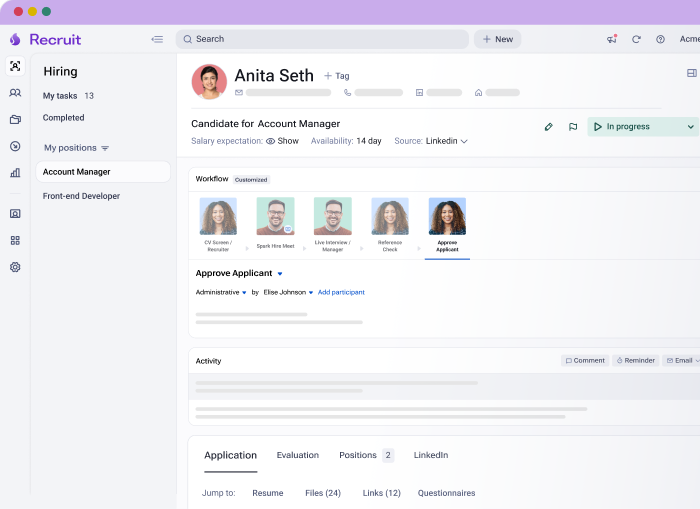
Now the first thing that Spark Hire takes me to is the workflow because it is the backbone of the entire hiring process.
Everything you and your team does and everything the candidate experiences begins right here with the fully customizable workflow. Here, I can easily move steps around. I can quickly add a step and from a list of options, decide what needs to happen next.
I can also easily remove a step. So anything that I need to do to align with the way that we need to work can be done right here. From there, I can assign ownership to each step. That could be a single person or multiple stakeholders depending on how your team operates.
You can quickly do things like assign multiple people to a panel interview or operational things behind the scenes. And it’s very easy to make change, like removing people from steps or changing the main owner. This drives clear accountability at every stage. Everyone knows what they own, and nothing falls through the cracks.
Now I can start layering automation into the workflow. For example, I can create an AI resume review step, where candidates are automatically moved to the next step in the process based on my criteria. So when you log in the next time, that candidate that applied, their resume has already been reviewed, and the AI tells you whether or not they are a strong, good, partial, or low fit based on how their resume stacks up against the requirements for the role. Now, I also have the ability to use the AI resume review ranking as a way to decide whether I want them to automatically to the next step or if I want to create a review step so that I review before that candidate either goes to that next step or before I decide to reject them.
So instead of me manually reviewing every single applicant that comes in, the system helps take action instantly. But it’s important to note, the AI doesn’t make decisions for you. It is just letting you know how that candidate stacks up against your requirements for the role. If that candidate needs to be rejected, you are the one to do it.
If that candidate needs to be moved forward, you’re deciding what fit ranking gets them moved forward, and that happens automatically. Spark Hire is also creating tasks for every step owner. So that means every person involved in hiring knows exactly what they need to do and when they need to do it. As a recruiter, I have many tasks to complete across all my roles, and they’re all grouped by the action which needs to take place.
This helps me stay on track with my work. It’s also important that when a manager logs in, they see what they’re responsible for and nothing more because that’s how things slow down. People get confused and disengaged when they’re not sure what they need to focus on.
So let’s say I log in as one of the managers on the team, David. You’ll notice the difference. He only has a few tasks for positions he’s the hiring manager for. All he needs to do is focus on what’s in front of him, such as the interviews he needs to complete.
When he’s ready to do an interview, all he needs to do is click interview, and he’s taken to the candidate details, an interview brief, and prompted to enter his notes and evaluation. This is great because you’re not chasing updates. You’re not trying to figure out where everything stands. The process keeps moving because everyone has a clear direction, and it’s all in one place.
And beyond what we covered here, Spark Hire also supports the broader workflow across your team, from managing requisition and offer approvals, to generating and sending e signature offers, to controlling access with location and role based permissions.
So instead of managing hiring across disconnected tools and rigid workflows, you have one structured process built the way your team actually hires.
Chapter 2 – Quickly find and identify qualified applicants
Okay. So you’re manually posting jobs across multiple platforms just to get visibility. And once applicants start coming in, the harder challenge begins, figuring out who’s actually qualified. Instead of quickly moving candidates forward, you get stuck reviewing, sorting, and second guessing. What you really need is a way to both get applicants into your process and quickly identify the ones worth moving forward. Let me show you how Spark Hire helps you do that. Everything starts with the job itself.
Instead of starting from scratch, I can use AI to generate a job description based on the role and requirements. This gives me and the hiring manager a strong starting point that we can quickly refine, so we’re not wasting time building from a blank page.
From there, I can customize questions that’ll show up on the application for this role. For example, I can add knockout questions to make sure applicants meet specific requirements, like certifications, experience, location, or work environment. That way, you’re not just collecting applications, you’re filtering for alignment from the very beginning. Once everything is ready, I can publish the position. But first, let’s pop over to the job board settings to familiarize you with some of your options.
Spark Hire integrates with more than thirty job boards, including the most popular ones, like LinkedIn, Indeed, and ZipRecruiter, supporting both free and paid listings. At the company level, you can decide if you want jobs to automatically post to specific job boards when you publish them or to allow recruiters to manually decide. Now when you publish the position, it’ll not only go to the job boards you specified, but it’ll also automatically update your career site. You have the option to integrate Spark Hire with your website directly or use a hosted option, which you can customize with your logo and brand color.
As applicants start coming in, everything flows into one place inside the ATS. They automatically follow the hiring workflow we set up earlier, and every applicant source is tracked. If you’re using AI resume review, all applicants can be sorted based on their AI resume review score. In the hiring workflow, you can decide if you want candidates to automatically move forward based on their score or to assign a task to someone to review them manually.
When reviewing an applicant, you have a simple go or no go action to choose from, making it easy to move through applicants quickly. Because everything is centralized, you’re not just limited to applicants for this role. You can search across candidates from current and past openings. When searching, you can filter by a variety of fields, including a past AI resume review score.
If you identified previous candidates you want to reach out to, you can send them an email to notify them about your new opening in just a couple clicks. Over time, you’re building a talent pool you can actually reuse instead of starting from scratch every time. And beyond what I showed here, Spark Hire also helps you expand how you find and engage candidates, from running employee referral programs to sourcing candidates with a Chrome extension or integrated tools to managing leads for future openings to even supporting internal mobility. With Spark Hire, you’re not just filling roles.
You’re building a repeatable way to find qualified talent. So instead of manually posting jobs and sorting through every application, you can manage everything in one place and quickly focus your time on the candidates who are actually qualified.
Chapter 3 – Get to know your candidates better
Resumes alone don’t give you enough information to confidently move candidates forward, especially when every application looks polished. You’re left trying to evaluate candidates based on limited or inconsistent information, which often leads to more interviews, more back and forth, and more guesswork early in the process. What you really need is a way to gather meaningful insights about candidates earlier so you can make better decisions without investing more time upfront. Let me show you how Spark Hire helps you do that.
Spark Hire includes a set of built in assessments that help you get to know your candidates beyond the resume. These include one way video interviews, a predictive behavioral assessment, and automated reference checks. The key is that all of these can be built directly into your hiring workflow, so they happen automatically as candidates move through your process. For example, after a candidate is identified as a strong fit through AI resume review, they can automatically be advanced to a one way video interview.
That video interview is triggered instantly without your team needing to coordinate scheduling or send follow ups. With one way video interviews, you can ask candidates a consistent set of questions and have them record video responses on their own time. Most customers will use this in place of a phone screen because you can gain more insight without the calendar struggles. You can fully customize these questions based on the role, so you’re evaluating what actually matters.
Plus, Spark Hire AI is capable of transcribing, summarizing, and evaluating submissions against what’s important to you for quick prioritization. Another option is the predictive behavioral assessment. Candidates answer multiple choice questions and are scored against six to nine behavioral competencies aligned with the role. This research backed assessment is proven to predict a candidate’s likelihood to be successful in the position.
In the workflow, you’ll choose a behavioral profile, which is the set of competencies you’re measuring. This can be customized, or you can choose an out of the box one made by Spark Hire. And a little later in the process, instead of manually reaching out for references and playing scheduling tag, you can automate that process as well. Customizable reference surveys are sent automatically, and responses are collected in a structured format, so you get consistent, actionable feedback without the back and forth.
All of these results, video responses, behavioral insights, and reference feedback are added to the candidate’s evaluation in one place. So instead of piecing together information from different tools or conversations, your team has a complete picture of each candidate when making decisions. With Spark Hire’s assessment capabilities, you can stop relying on resumes alone and gather deeper insights earlier in the process, helping your team evaluate candidates with more confidence and make better decisions faster.
Chapter 4 – Schedule interviews without delays
Coordinating interviews is one of the biggest sources of delay in the hiring process. You’re going back and forth to find availability, juggling multiple calendars, and trying to line up candidates with hiring teams. And every delay slows down your decision and increases the risk of losing top candidates. What you really need is a way to move candidates forward without all the coordination overhead. Let me show you how Spark Hire makes that possible. To set up scheduling, each interviewer simply connects their calendar.
Spark Hire supports a variety of calendar providers, including Google and Microsoft, so everyone on the hiring team can sync their availability in just a few steps. From there, each person defines their availability for scheduling. This ensures that any time shown to candidates or other team members always reflects their real working hours. You can also set dedicated time blocks for interviews so your calendar always has availability reserved, and you’re not competing with other meetings.
On top of that, you can control how your time is used. For example, you can limit how many hours per day or per week can be booked for interviews, so no one gets overwhelmed. And you can require a minimum notice period, which prevents last minute bookings and gives everyone time to prepare. Once calendars are connected and preferences are set, scheduling becomes seamless across the entire hiring team.
Recruiters, hiring managers, and any other stakeholders can all be included, with their availability automatically coordinated in the background. There are a few ways to schedule interviews with candidates. One option is to invite the candidate to select a time. In this case, the system pulls an availability from everyone involved in the interview and presents it to the candidate in a simple booking experience.
You can define things like meeting type, duration, add a meeting room if needed, or include a Zoom or video link directly in the invite. Before sending, you can preview availability and review the message that will be sent to the candidate. While this can be done manually, it can also be fully automated as part of your workflow. For example, when a candidate reaches a certain step, they can automatically receive a scheduling link, so there’s no need for manual coordination.
When the candidate opens that link, they see a list of available times based on everyone’s calendars. They can browse options, select a time that works, and confirm. And if they don’t see a suitable time, they can share their availability so your team can follow-up. But in most cases, they simply pick a time and book it.
Once confirmed, calendar invitations are automatically sent to everyone involved, and the interview is scheduled instantly. There’s also another option. Instead of having the candidate choose a time, you can schedule the interview directly. The system pulls in real time availability for all participants into a single calendar view.
From there, you can select a time that works for everyone and send the invite immediately.
So whether you want to automate scheduling, give candidates flexibility, or book interviews on behalf of hiring managers more easily, everything happens in one place with no back and forth and no coordination overhead.
Chapter 5 – Get structured feedback on time without the follow-up
Interview feedback is one of the biggest bottlenecks in the hiring process. Evaluations get delayed, feedback lives in different places, and recruiters end up chasing hiring managers just to keep the process moving. What you really need is a way to collect structured feedback quickly without constant follow-up. Let me show you how Spark Hire helps you do that.
Everything starts with interview structure. First, I’ll quickly create a job description using Spark Hire AI because everything downstream in the hiring process is influenced by it. Next, I’ll jump into the scorecards tab on the position and generate a scorecard from that job description using Spark Hire AI. I also have the option to create scorecards for each individual interview round. Now that I have my scorecard, it’s time to generate interview questions for the interviews in my process. This helps create a more consistent interview experience across the team and ensures candidates are evaluated against the same criteria.
Of course, I can review and edit the questions before saving them. And once they’re finalized, those questions become available to interviewers during the interview itself. When an interview is scheduled, interviewers can quickly access the candidate profile directly from the calendar event. They’ll also see the interview in their task list within the platform. From there, they simply click interview and are taken to a single page with the candidate’s information, an interview brief, the interview questions, and a section to complete their evaluation.
So instead of jumping between multiple tabs and documents, interviewers can stay focused on the conversation itself. During the interview, they can take notes in real time, leave quick reactions, and capture feedback while everything is still fresh. And once the interview is complete, submit feedback is fast and simple through the evaluation form. If feedback isn’t submitted right away, Spark Hire can automatically send reminders through email or chat based on your notification settings. So instead of recruiters manually following up with interviewers, system helps keep evaluations on track automatically. You also have the option to use Spark Hire’s AI notetaker during interviews. The AI notetaker can capture the conversation and generate a helpful starting point for interview notes and evaluations.
This helps interviewers save time while still giving them full control over the final feedback that gets submitted. Once evaluations are complete, all feedback is centralized directly on the candidate profile. And for a faster, high level view, Spark Hire AI can automatically summarize evaluations across every stage of the hiring process with the ability to trace those summarized insights back to the original feedback. The evaluation tab gives hiring teams a single place to review scorecards, notes, and recommendations, making it easy to quickly understand a candidate’s overall fit for the role. So instead of chasing and piecing together evaluations across different systems, you get structured input collected on time in one place so your team can make decisions faster and with more confidence.
Chapter 6 – Analyze and improve your hiring
Without clear visibility into your hiring process, it’s hard to know what’s working, where candidates are getting stuck, or how your team is performing over time. Spark Hire gives you the reporting and analytics you need to identify bottlenecks, improve efficiency, and make better hiring decision.
So when you go into analytics, you’ll find a library of out of the box reports already built for you by Spark Hire, designed to surface the most important hiring insights right away. You can access reports across workflows, teammates, sources, sourced leads, management dashboards, candidate dispositioning, core KPIs, and more. The first report I’m going to open is candidates in progress. I like this report because it gives you a quick view of all candidates currently moving through your hiring process across different roles.
You can drill into a table view of those candidates, customize columns, apply filters, and export the data if you want to share it with other stakeholders. You can also break this down by position to see how many candidates are sitting in each stage of the hiring process. This makes it easy to identify where candidates may be getting stuck and how long they’ve been sitting in a particular stage. You also have multiple ways to visualize the data, including bar charts, column charts, and pie charts, depending on your preferences.
And across all reports, you can apply filters using a wide variety of fields, such as position, department, or custom position fields specific to your organization. You can even bookmark commonly used filters or save them as defaults so reports load the way you want. And if there’s a report you access frequently, you can mark it as a favorite for quick access later. The next report I’ll show is the candidate funnel report.
This gives you a visual view of conversion rates between stages, including how many candidates move from one step to the next, and ultimately, how many are hired. This is especially useful for understanding past hiring performance and forecasting what your future pipeline may need to look like to support upcoming hiring goals. Now let’s build a custom report. I can create a new custom dashboard, filter it for a specific role, give it a name, and then start adding widgets.
This is where reporting becomes highly flexible because you can choose from a comprehensive library of widgets representing different KPIs, metrics, and visualizations. You simply select the widgets you want, add them to the report, and build a dashboard tailored to the insights you care about most. Just like with out of the box reports, you can favorite reports, share them with stakeholders, and even benchmark certain metrics against other organizations. So instead of relying on assumptions, you have real visibility into your hiring process, helping you identify bottlenecks, improve performance, and make better hiring decisions over time.
Spark Hire's ATS is built around one principle
Lean HR teams should be able to run hiring from start to finish without chasing feedback, managing reminders, or rebuilding the process in email.
We design every capability to move work off your plate: automating follow-up, keeping hiring managers in the loop without HR as the middleman, and centralizing feedback so nothing gets lost in random threads.